Production Deployment Guide
This document outlines the steps required for deploying the Satoshi Port application to production, covering the Smart Contract, Frontend, and Backend components.
Contract Deployment
Prerequisites
- Private Keys: You need the private keys to deploy a new smart contract. Ask Sibi or Michael for access.
Deployment Steps
- Trigger CI: Push a new tag to the
developbranch. - Obtain Artifact: Wait for the CI job to complete. It will produce a new WASM file for the smart contract (see an example release).
- Update Configuration: Update the contract version accordingly in the production.justfile.
- Deploy: Run the following command to deploy the newer version of the contract:
Note: Ensure you handle any necessary state migration upgrades if applicable.just prod::deploy
Frontend Deployment
Frontend deployment is managed using Cloudflare Pages.
- The
mainbranch serves as the source of truth for production. - To trigger a deployment, create a pull request for your changes to the
mainbranch.
Backend Deployment
Backend deployments are managed via the devops repository.
Deployment Steps
- Update the Docker image version in the kustomization.yaml file.
- The deployment should then be synced via K3s ArgoCD.
Monitoring & Operations
- Documentation: For more details, refer to the Kube360 cluster documentation.
- Alerts: You should join the
k3s-alertmangerSlack channel to monitor cluster alerts. Ask Sibi or Noris to be added to the channel.
How to Run Indexer DB Migrations
1. Build and push the new Indexer image to GHCR.io
Go to the satoshi-port repository, then open the Actions tab. Select the indexer workflow and run it from the branch you want to use for the migration. Once the workflow is complete, open it and navigate to the Push image step. There you will find the new image tag — copy it.
2. Update the indexer-ingester image tag in the DevOps repo
Open a PR in the DevOps repo, replacing the old image with the new one in the /k3s/staging/kustomization.yaml file. You will need approval before merging into main.
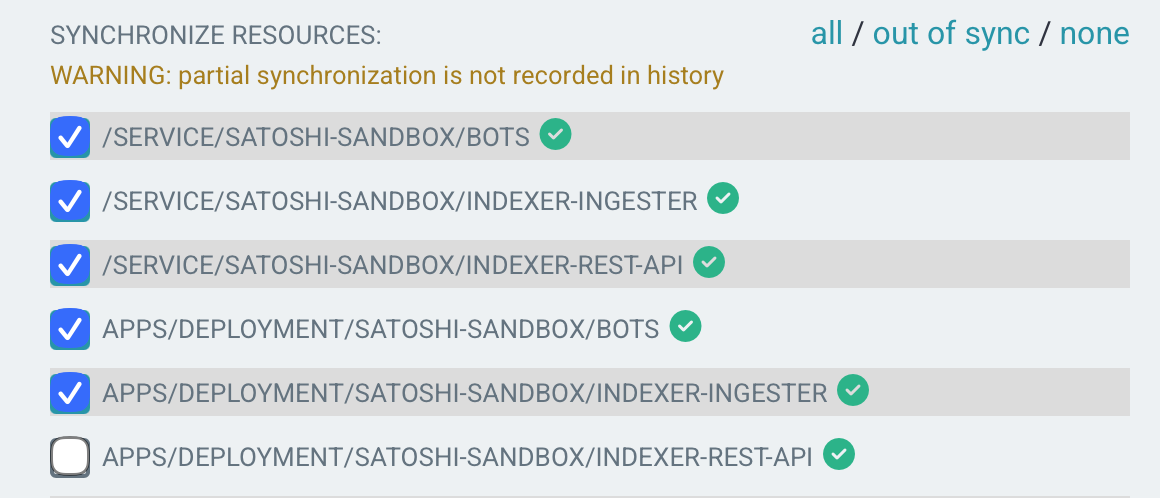
After merging, go to K3s ArgoCD and select the project where you are applying these changes: satoshi-sandbox or satoshi-mainnet. Check the Diff, and if the only change is the indexer-ingester image tag, you can click on Sync. Make sure you check all the resources except the one related to the indexer-rest-api deployment, which must be unchecked, and then click Synchronize.
3. Run migrations
The indexer-ingester will run the migrations automatically, so you do not need to do anything. Just monitor for any error notifications in ArgoCD or the monitoring channels in Slack.
4. Synchronize the indexer-rest-api
Similar to step 2, go to Argo, click on Sync. This time, select all the resources, including the indexer-rest-api. Finally, click on Synchronize.
If everything is working well, it means the migrations ran successfully and everything is operating normally.
Reminder: If any error occurs, notify the Slack channel immediately.